Report Results Panel
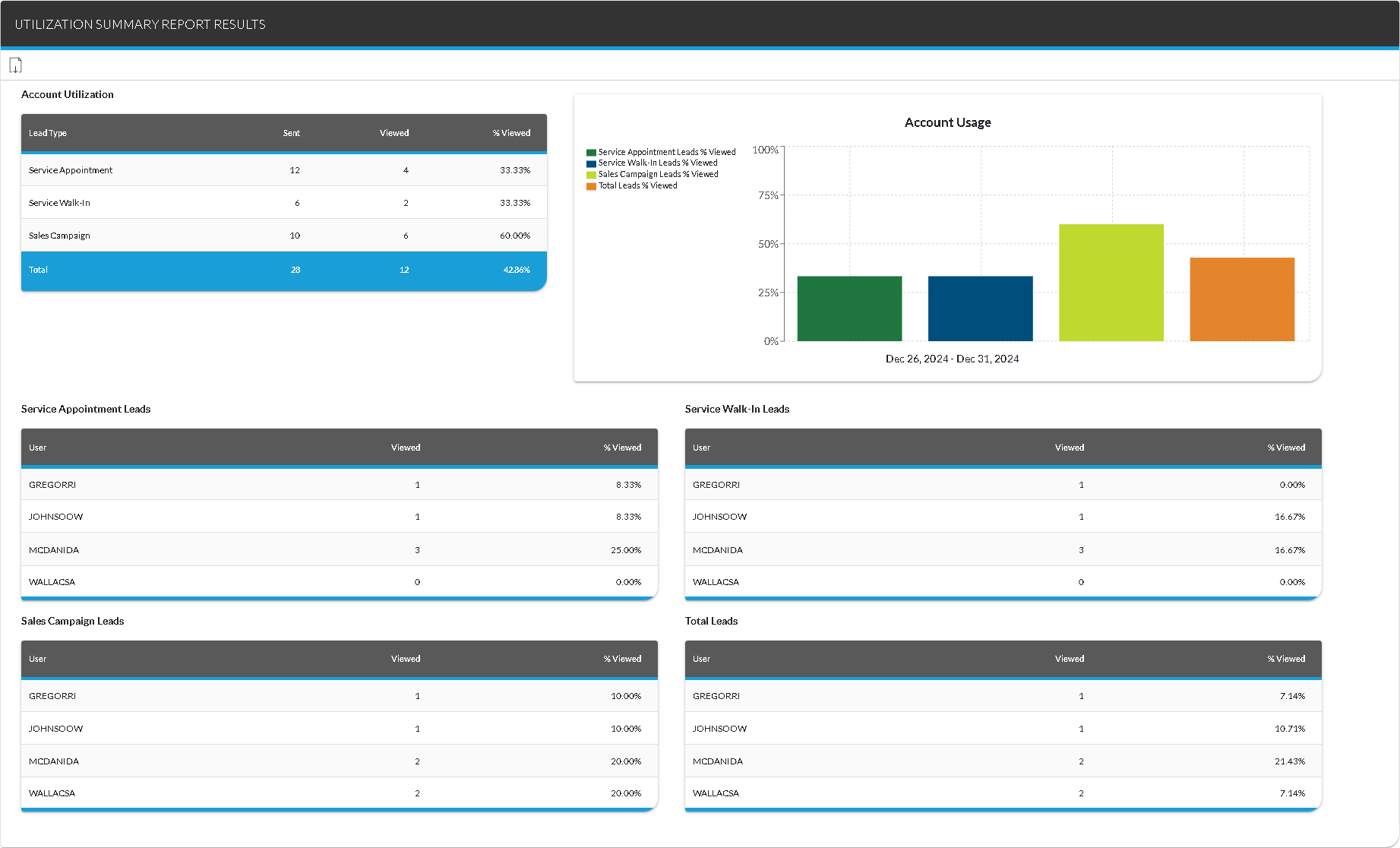
The Report Results panel on the Utilization Summary screen is used to view the Utilization Summary report, which is used to review employees' usage of the XtreamService application. Using this report, managers can review the total number of leads that were sent to the integrated customer relationship management (CRM) application. In addition, managers can review the number of leads that were viewed using the XtreamService application or FOCUS in the Digital Retail Platform.

|
To access the Report Results panel, enter criteria in the Report Criteria panel on the Utilization Summary screen. Then click the RUN button. |
To export the information on this panel, click the  (Export Report) icon. The Export Report? window displays. Select a file format, such as .csv,.pdf, or .xlsx, and click the EXPORT button. The results are exported in the selected file format and are saved to the PC or network drive.
 Account Utilization Section
The Account Utilization section is used to review the total number of leads sent and viewed for each type of lead.
The following columns are available in the Account Utlization section.
Lead Type: The type of lead displays, such as Service Appointment or Sales Campaign.
Sent: The number of leads that were sent to the customer relationship management (CRM) application for the corresponding user displays.
Viewed: The number of leads that were viewed displays. Viewed leads include lead sheets that were printed or viewed on the Lead Sheet panel as well as leads viewed in FOCUS in the Digital Retail Platform.
% Viewed: The number of viewed leads displays as a percentage. This percentage is calculated by dividing the number of leads in the Viewed column by the number of leads in the Sent column.
Account Usage Section
The Account Usage section is used to review the percentage of leads that were viewed for each type of lead as a graph. Using this graph, you can visually compare each lead type to identify which types are more frequently reviewed.
Hover the mouse cursor over a bar on the graph to display a tooltip with the total percentage of leads that were viewed as well as the percentage viewed by each user.
Service Appointment Leads Section
The Service Appointment Leads section is used to review the number of service appointment leads that were sent and viewed by each user.
The following columns are available in the Service Appointment Leads section.
User: The User ID of the user who viewed the leads displays.
Viewed: The number of leads that were viewed
% Viewed: The number of viewed leads displays as a percentage. This percentage is calculated by dividing the number of leads in the Viewed column by the number of leads in the Sent column.
Service Walk-In Leads Section
The Service Walk-In Leads section is used to review the number of service walk-in leads that were sent and viewed by each user.
The following columns are available in the Service Walk-In Leads section.
User: The User ID of the user who viewed the leads displays.
Viewed: The number of leads that were viewed
% Viewed: The number of viewed leads displays as a percentage. This percentage is calculated by dividing the number of leads in the Viewed column by the number of leads in the Sent column.
Sales Campaign Leads Section
The Sales Campaign Leads section is used to review the number of sales campaign leads that were sent and viewed by each user.
The following columns are available in the Sales Campaign Leads section.
User: The User ID of the user who viewed the leads displays.
Viewed: The number of leads that were viewed
% Viewed: The number of viewed leads displays as a percentage. This percentage is calculated by dividing the number of leads in the Viewed column by the number of leads in the Sent column.
Total Leads Section
The Total Leads section is used to review the total number of leads that were sent and viewed by each user.
The following columns are available in the Total Leads section.
User: The User ID of the user who viewed the leads displays.
Viewed: The number of leads that were viewed
% Viewed: The number of viewed leads displays as a percentage. This percentage is calculated by dividing the number of leads in the Viewed column by the number of leads in the Sent column.
Click here for a list of products that may be mentioned in this help file.